Your OneNote notes, right where your team works
Teams keep meeting notes, call notes and plans in Microsoft OneNote. Stellar OneNote Integration links those pages to the records they relate to in your Power Platform apps, and keeps both sides in sync.
Notes in two places means half the story in each
When notes live only in OneNote, everyone else working on the record misses them. Stellar OneNote Integration puts them on the record without changing how people take notes.
Link OneNote pages to records
Pick any page from your notebooks, shown as Notebook/Section/Page, and link it to one or more records.
See your notes in your app
Each linked page appears on the record's timeline as a OneNote Activity, so you can read the notes without leaving Power Apps or Dynamics 365.
Edit in either place
Update notes in your app and they're written back to OneNote. Update them in OneNote and the change comes back.
Conflict protection
If a page changes in both places, the newer OneNote version is never overwritten. The activity is marked as a conflict so you can review it.
Automatic sync
Syncs every 15 minutes in the background. Nothing to install on users' computers.
Your data, your tenant
It runs on Power Automate and Microsoft Graph inside your tenant. PJMSoft never receives, stores or processes your data.
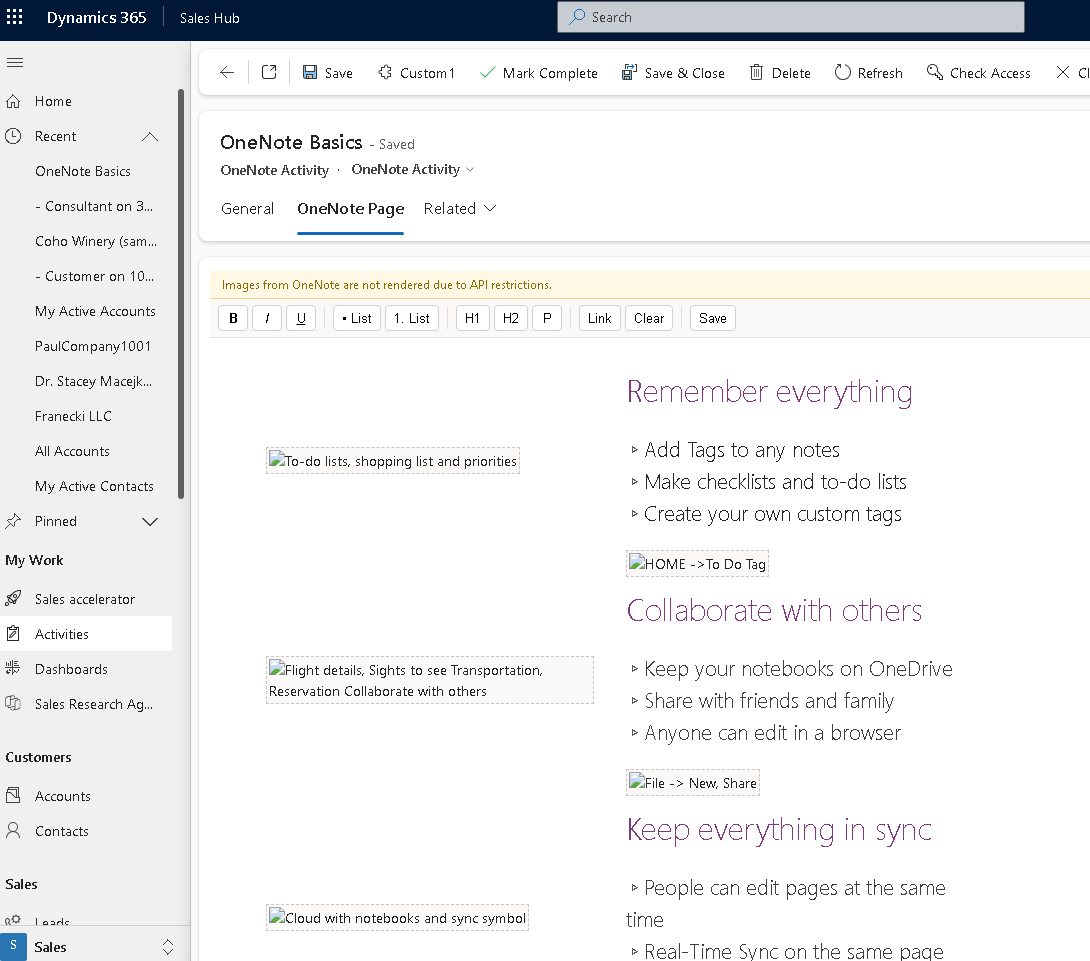
Read and edit OneNote pages on the record
Open the OneNote Activity on the record's timeline and select the OneNote Page tab. The page's headings, lists and text appear in a rich editor with a simple toolbar.
- Sync status at a glance: Synced, Pending Push or Conflict.
- One click to OneNote: the Page Content URL opens the original page.
- Built on standard activities: it works with the timeline, views and security roles you already use.
Requirements
- A Power Platform or Dynamics 365 environment with Dataverse
- Microsoft 365 with OneNote for Business
- Power Automate (included with most Power Apps and Dynamics 365 licenses)
Known limitations
- Images in OneNote pages aren't displayed in the in-app editor because of Microsoft Graph restrictions. They stay intact in OneNote.
- Sync runs every 15 minutes, not in real time.
Get started with a free trial
Install Stellar OneNote Integration from Microsoft AppSource. For questions, see our Help page or contact us.